
Table of Contents
HP Omen Obelisk Review: Design, Gaming Performance, Cooling, and Upgrade Options
The HP Omen Obelisk is a compact gaming desktop designed for players who want high performance without a bulky tower. Its clean exterior, tempered-glass side panel, and powerful hardware make it an attractive choice for gaming and demanding desktop tasks.
The high-end configuration reviewed here combines an Intel Core i9-9900K processor, an NVIDIA GeForce RTX 2080 Ti graphics card, up to 64GB of DDR4 memory, and fast solid-state storage. This hardware makes the system suitable for high-refresh-rate gaming at 1440p and demanding 4K gaming, depending on the title and graphics settings.
However, powerful components are only part of the buying decision. Cooling noise, upgrade flexibility, storage capacity, and price also matter. This review explores the HP Omen Obelisk’s design, performance, internal layout, available configurations, and long-term value.
HP Omen Obelisk Design: Compact and Stylish
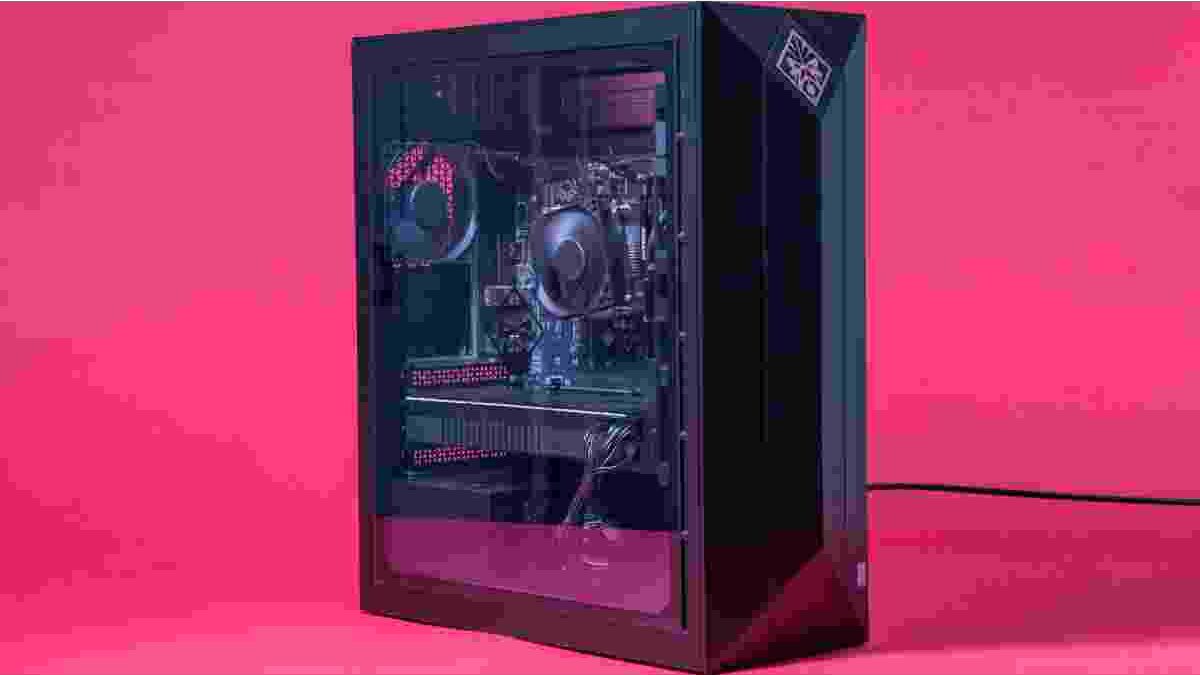
The HP Omen Obelisk stands out because of its relatively small footprint. The reviewed chassis measures approximately 17.1 × 6.5 × 14.1 inches. Its MicroATX-based design keeps the tower narrower and less deep than many conventional gaming desktops.
This compact construction is useful if you have limited desk space or prefer to keep your PC close to your monitor. Despite its smaller size, the system houses powerful desktop components, including a full-size graphics card and a liquid-cooled processor in the premium configuration.
The exterior also avoids the excessive styling found on some gaming machines. Its dark chassis, restrained front logo, and clean lines give it a professional appearance. A tempered-glass side panel adds a gaming touch by revealing the internal components and lighting.
The glass panel is particularly appealing to users who enjoy showcasing their PC builds. However, cheaper configurations may use metal side panels instead. Buyers should confirm the exact design before ordering because the appearance can vary by model.
Tool-Free Side Panel Access
Accessing the interior is one of the Obelisk’s more convenient design features. The side panel uses a release mechanism that allows users to open the case without removing several conventional screws.
This makes routine maintenance easier. You can inspect the components, check for dust, and plan certain upgrades without spending much time dismantling the chassis.
The internal layout also looks tidy. Cables are routed away from the main component area, leaving the motherboard and memory slots relatively accessible. However, access is not identical for every component. Some upgrades may require extra steps, and you should consult the service instructions for your particular model before opening the system.
HP Omen Obelisk Specifications
The premium configuration combines high-end components from its generation. The specifications below describe the reviewed model rather than every Omen Obelisk desktop.
| Component | Reviewed configuration |
|---|---|
| Processor | Intel Core i9-9900K |
| Graphics card | NVIDIA GeForce RTX 2080 Ti |
| Graphics memory | 11GB GDDR6 |
| System memory | Up to 64GB DDR4 |
| Storage | Two 512GB NVMe SSDs and a 2TB HDD |
| Motherboard | MicroATX, Intel Z390 chipset |
| Power supply | 750W in the premium configuration |
| CPU cooling | Liquid cooling |
| Operating system | Windows 10 Home on the reviewed model |
Specifications can differ between product numbers and regional versions. Some configurations use less powerful processors, different graphics cards, smaller memory capacities, and different storage arrangements.
The premium model also provides substantial storage flexibility. NVMe SSDs offer fast access to applications and games, while a mechanical hard drive provides additional space for large files and less frequently played titles.
One important consideration is usable capacity. Two 512GB SSDs configured in RAID 0 do not provide the same redundancy as a mirrored storage setup. If one drive fails, data stored across the array may become inaccessible. Regular backups remain important.
Gaming Performance: 1440p and 4K Gaming
The Core i9-9900K and RTX 2080 Ti were high-end desktop components when this configuration launched. Together, they provide strong gaming performance and can handle demanding games at 1440p with high frame rates.
At this resolution, players can balance visual quality with smoother gameplay. Competitive titles may achieve particularly high frame rates, although the results depend on the game, graphics settings, and monitor refresh rate.
The RTX 2080 Ti also makes 4K gaming possible. Many games can approach or reach 60 frames per second with suitable settings, but this is not guaranteed in every modern or demanding title. Ray tracing can increase the graphics workload, so performance may fall when advanced effects are enabled.
For a broader understanding of the graphics hardware, read our guide to RTX 2080 Super characteristics. The RTX 2080 Super and RTX 2080 Ti belong to the same graphics generation, but they are different models. Their performance and memory specifications should not be treated as interchangeable.
Performance Beyond Gaming
The eight-core, sixteen-thread Core i9-9900K can also handle demanding desktop tasks. Video editing, multitasking, content creation, and other CPU-intensive applications can benefit from its processing power.
The amount of memory installed also matters. A 64GB configuration offers plenty of capacity for heavy multitasking and some professional workloads. However, many gamers do not need that much RAM. A smaller configuration may be sufficient, depending on the games and applications being used.
Real-world performance will vary with software, background tasks, driver versions, and cooling conditions. A high-end specification provides a strong foundation, but it does not guarantee identical results in every application.
Cooling and Fan Noise
Cooling is an important part of the Obelisk’s performance. Powerful components generate heat, especially during long gaming sessions or demanding rendering tasks. The premium configuration uses liquid cooling for the CPU, while case ventilation helps move warm air away from the internal components.
The compact case creates a practical challenge. A smaller chassis can save space, but airflow and fan placement become more important when high-performance hardware is installed.
The main drawback reported with this configuration is fan noise under heavy loads. When the CPU and GPU work hard, the cooling system may become noticeably louder. This can be distracting if the PC sits directly beside your desk in a quiet room.
You can help maintain effective cooling by keeping the ventilation areas clear, cleaning dust filters where fitted, and avoiding cramped placement against walls or inside poorly ventilated furniture.
It is also worth remembering that fan noise depends on workload and ambient temperature. Everyday browsing may be much quieter than gaming or rendering. If quiet operation is your priority, compare cooling designs and noise measurements before choosing a desktop.
Configurations, Storage, and Upgradeability
One advantage of the Omen Obelisk range is that it was offered in several configurations. Entry-level models used less powerful processors and graphics cards, while higher-end versions provided stronger hardware and more memory.
Depending on the model, buyers could find systems with Intel Core i5, Core i7, or Core i9 processors, as well as selected AMD Ryzen options. Graphics choices also varied across the range.
This matters because the premium configuration may be excessive for someone who mainly plays esports titles or uses everyday applications. A less expensive model can offer better value if its performance matches your needs.
Can You Upgrade the HP Omen Obelisk?
The internal layout supports several potential upgrades, but compatibility must be checked before purchasing replacement parts.
- Memory: Confirm the number of available slots, supported DDR4 modules, and maximum capacity for your exact motherboard.
- Storage: Check the available M.2 connectors, drive bays, and supported drive types before adding an SSD or hard drive.
- Graphics card: Measure the available space and verify power connectors, card dimensions, and power supply capacity.
- Cooling: Confirm mounting compatibility and radiator clearance before replacing the CPU cooler.
- Power supply: Check the required wattage, physical dimensions, and connectors before upgrading high-power components.
The motherboard and power supply can limit future upgrades. A graphics card that fits physically may still require more power than the existing unit can safely provide.
Before buying a used Obelisk, ask the seller for the exact product number and installed specifications. Also check the condition of the storage drives, cooling system, and power supply. These checks can help you avoid unexpected upgrade costs.
Design Comparison and Buying Considerations
Gaming desktops vary in their approach to appearance, cooling, and internal layout. For example, the Alienware Aurora R9 design language provides another perspective on how gaming PC manufacturers balance distinctive styling with practical hardware design.
The Omen Obelisk takes a more restrained approach. Its compact rectangular chassis can suit a home office or gaming setup without dominating the space. Its glass side panel adds visual appeal, while the accessible interior helps with routine maintenance.
Still, design should not be the only reason to buy it. The age of the platform is an important consideration. The Core i9-9900K and RTX 2080 Ti are older components, so buyers should compare current used-market prices with newer systems before making a decision.
A refurbished or second-hand Obelisk may be attractive at the right price. However, warranty coverage, component condition, repair history, and the cost of replacement parts can affect its overall value.
For buyers who need a computer for fieldwork rather than desktop gaming, a device such as the Panasonic Toughbook FZ-55 serves a different purpose. It is designed around durability and mobile professional use, while the Omen Obelisk prioritizes desktop gaming performance. Choosing between them depends on the environment and workload, not just processor specifications.
Final Verdict: Is the HP Omen Obelisk Worth Buying?
The HP Omen Obelisk combines a compact design with powerful hardware, straightforward interior access, and a clean appearance. In its premium configuration, the Core i9-9900K and RTX 2080 Ti can deliver strong 1440p gaming and capable 4K performance with appropriate settings.
Its main advantages are its space-saving chassis, attractive glass panel, fast storage options, and range of configurations. Its weaknesses include noticeable fan noise under heavy loads, potentially high prices for premium models, and the limitations of an older hardware platform.
The best buying decision depends on the price and condition of the specific system. Choose a configuration that matches your actual gaming or productivity needs, and check upgrade compatibility before spending more on new components.
Overall, the HP Omen Obelisk remains an appealing compact gaming desktop when available at a sensible price. It is not automatically the fastest or best-value option, but its combination of performance and understated design makes it worth considering for the right buyer.